Weflow changelog

67 updates shipped in 2026339 all time

Showing November 2022 and earlier · Back to latest

November 2022

Introducing: The Admin Console 🙌

Your new one-stop shop to manage Weflow is here.

Here are some of the things you can do with the new console:

Please note: If you have no access to the admin console but require one, contact our support at hello@getweflow.com or reply to this email.

  • Invite and manage team members
  • See who in your organization is already using Weflow
  • Assign profiles to users (e.g. Account Executive, SDR, Sales Manager, …)
  • Assign panel, note, and pipeline templates to the different profiles
  • Deploy new sales methodologies within minutes
  • Manage all custom templates from a unified admin console
Custom objects in less than a day

Setting up custom objects in Weflow has never been easier. We improved the implementation time from a few days to less than 24 hours. Do you want to see your custom objects in Weflow today? Shoot us an email at hello@getweflow.com or fill out this form.

Copy & paste from your pipeline

If we can save you a click or two, we'll consider an investment well worth our time.

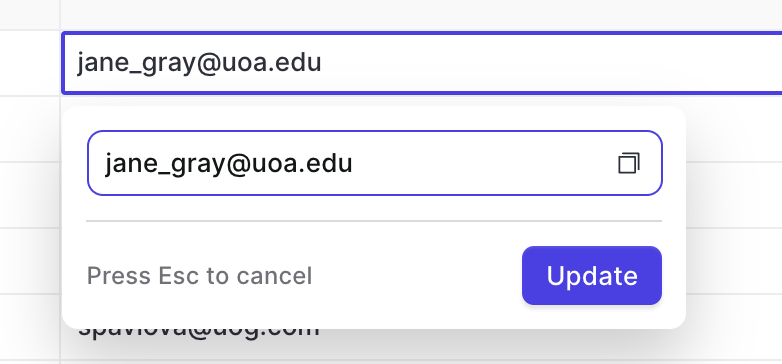
Hence, you can now copy values from fields with the copy button. This works for all text, email, and number fields.

Copy & paste from your pipeline

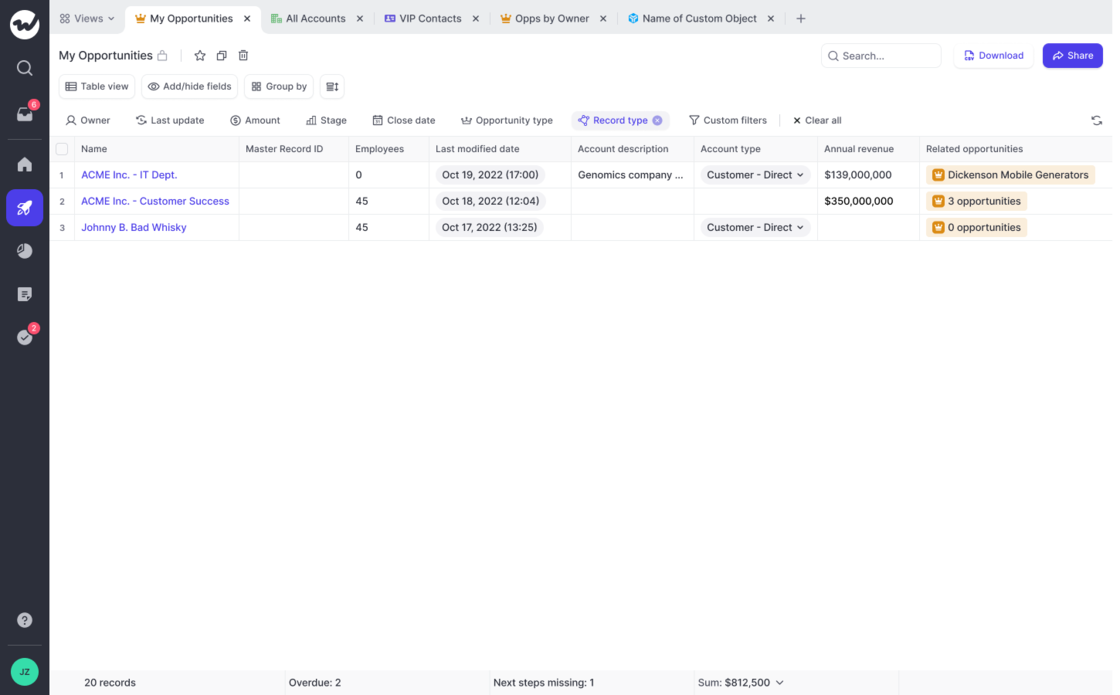
Quickly access related opportunities & contacts

Now, you can access opportunities and contacts by adding the "Related Opportunities" and "Related Contacts" field to your pipeline and panel views.

  • Clicking on a related record automatically opens the panel, so you can make updates or look up information as needed
  • You can make use of related fields also in our Chrome Extension

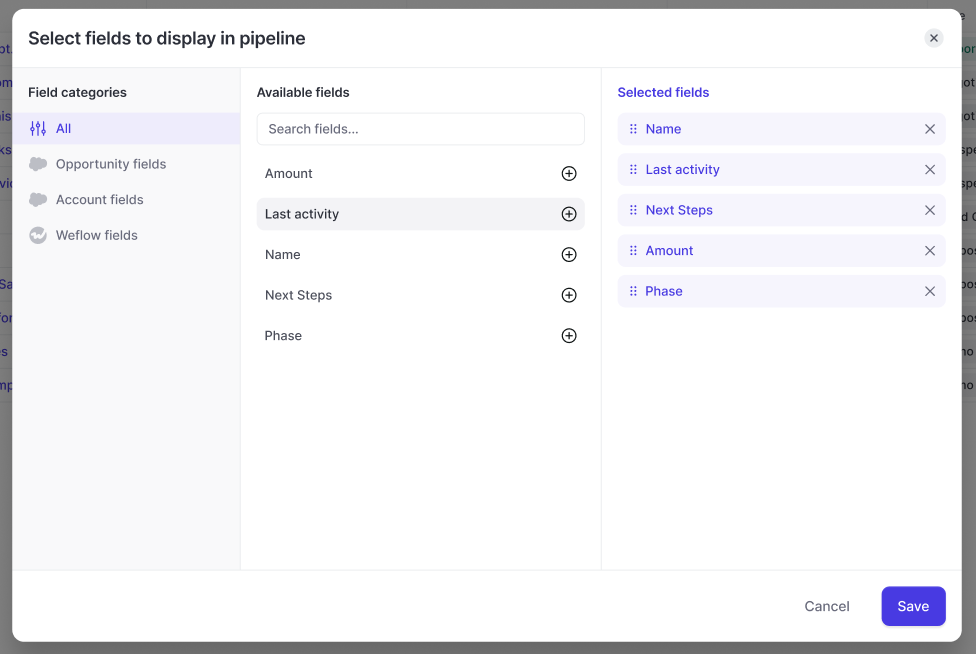
New Add/Hide fields design

With this updated design, users can now filter by field type. In addition, it is now possible to combine account and opportunity fields within an opportunity pipeline view.

  • Merge Opportunity and Account fields in any Opportunity-related pipeline view
  • Quickly filter by field type e.g. Weflow fields vs. Opportunity fields
  • Change the order or the fields with drag & drop
  • Quickly see which fields have already been added to a view
New Add/Hide fields design

Fixes for pipeline filters & Kanban board

In the latest release, we made the following improvements:

  • Kanban boards sometimes did not show any results depending on "group by" selection
  • Sorting columns in a table view did not update the order in the add/hide field selector
  • Using arrow keys while a cell in the table pipeline is selected, closed the cell
  • Some custom filters caused fatal errors in the pipeline view

A cleaner pipeline table

  • Previously, the table pipeline displayed a "No value" placeholder if the field was empty
  • We removed this placeholder and simply show a blank cell now
  • We did this to improve the readability of our table views
A cleaner pipeline table

October 2022

Introducing: Weflow Fields

There are a lot of hidden insights in your Salesforce CRM. Some are so well hidden, that sales reps sometimes wonder why they even make the effort to add all this data.

Weflow fields automatically calculate useful insights for you and surface them in your pipeline and panel.

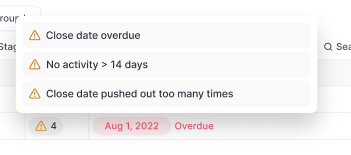
Example of Weflow fields:

Warning summary field:

You can add all Weflow fields via the Add/Hide button in the pipeline or panel.

Introducing: Weflow FieldsIntroducing: Weflow Fields

September 2022

Group by in your pipeline table view

A completely new pipeline experience with Weflow's group by feature 😊

  • You can now use the "group by" feature in your table views
  • Group your pipeline by owner, stage, or any other pick list or multi-pick list field

Access Salesforce from Gmail

Install our Chrome Extension to quickly access your pipeline, notes and tasks directly from the Google Workspace.

Please note, that this will work with every possible Gmail layout however the experience may vary depending on your settings

Access Salesforce from Gmail

Edit the activity details in the note pad

You can now edit activity details via the Weflow note pad. In addition, you can also connect notes to existing activities which have already been logged in Salesforce previously.

To edit activity details via the note pad:

  • Create a new note
  • Select an activity type
  • Sync the note
  • Once synced, you can edit the activity details

High-speed in North America

With more and more customers in the USA and Canada, we are continuously investing into speeding up our infrastructure.

Now, users in North America should experience a significant uptick in loading times when using our web app or Chrome Extension.

The entire deal history everywhere you go

  • Look at the entire deal history inside the panel
  • Quick access to emails, notes, activities, and important field updates
  • Make changes or log new activities with one click
  • Super fast editing from our web app or Chrome Extension

Auto-detect URLs in notes

Weflow not auto-detects URLs in your notes and let's you access the website with just one click.

Auto-detect URLs in notes

Connect your notes to existing activties

Weflow let's you connect notes to activities already residing within your Salesforce CRM.

  • Connect your note to an activity
  • Weflow will sync the content of your note into the activity
Connect your notes to existing activties

August 2022

Don't like the new tab by Weflow?

When installing the Weflow Chrome Extension, you'll get an entirely new "new tab" experience that is optimized for revenue teams with a fast access to your pipeline, notes and tasks.

With the latest Weflow update, you can now choose whether you want to keep the new tab or switch it off. In the past, deactivating the "new tab" experience, deactivated the entire Chrome Extension. Now, you can choose what works best for you.

Please note: We heavily recommend to keep the "new tab" experience alive and running as we constantly push new updates and improvements.

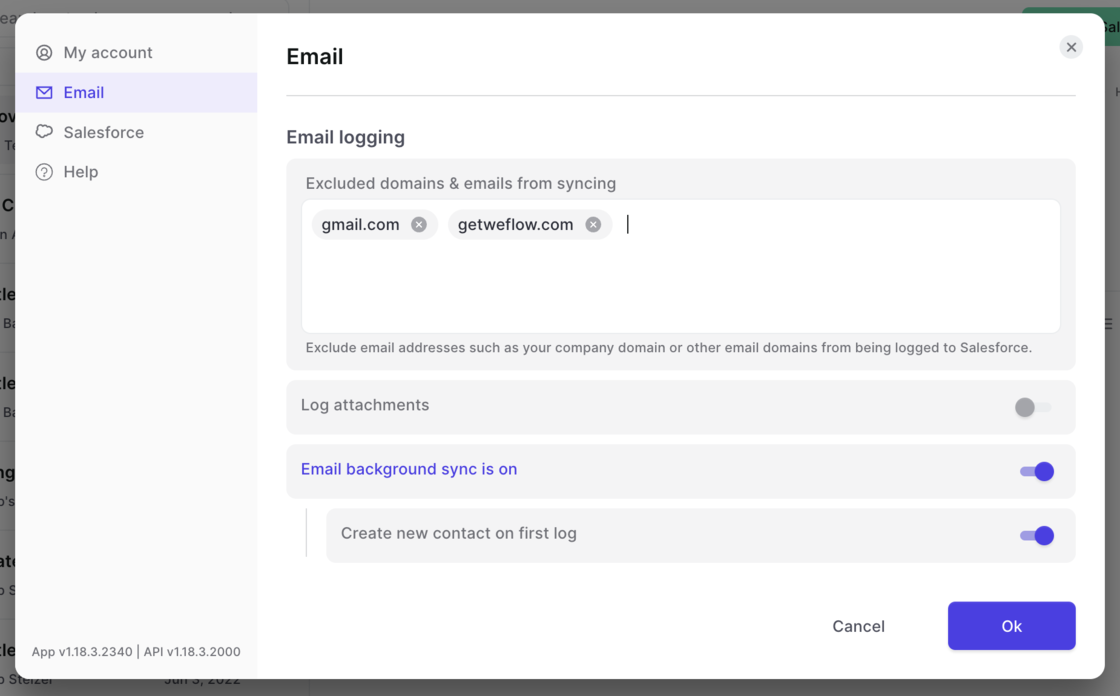
Domain exclusion for email logging

  • Set domains you want to avoid being logged by Salesforce
  • Deactivate logging attachments
  • Allow emails to be synced via background logging (to be used without the Weflow Chrome Extension)
Domain exclusion for email logging